Garmin is one of the most popular tools for tracking sports activities thanks to its accuracy and numerous built-in features. Although it is often associated with running, cycling, or swimming, Garmin can also effectively track bodyweight exercises and gym circuits, providing valuable support for those who prefer workouts without equipment or with interval exercises.
How to Enable Bodyweight Activity Tracking
- Activity Profile Selection:
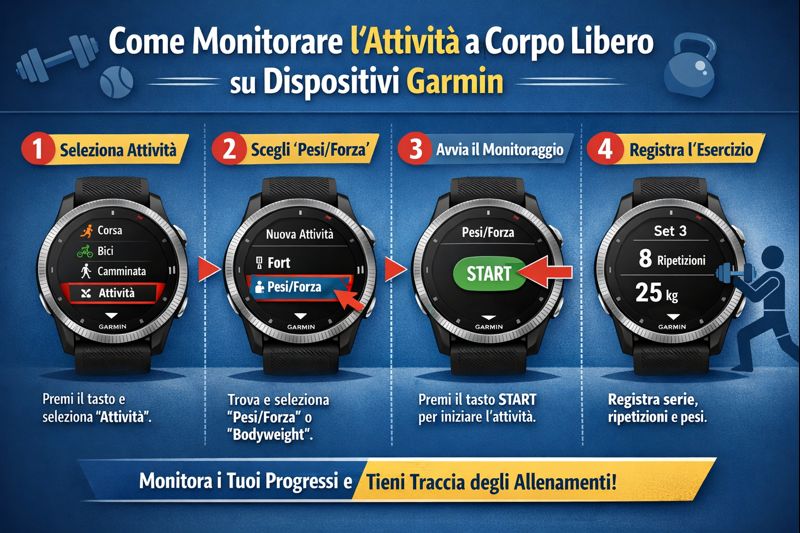
To get started, turn on your Garmin device and scroll to select the profile “Bodyweight Training”, “Circuit Training”, or a similar profile, depending on your model and available options. - Profile Customization:
In many Garmin models, you can customize the training profile by adding or removing data fields such as time, heart rate, calories burned, and repetitions. This customization helps tailor the device to the specific type of exercises you perform. - GPS and Sensor Activation:
For indoor activities such as bodyweight training or gym circuits, GPS is generally not required. However, make sure the heart rate monitor is active to track your heart rate during the workout.
How to Use the Garmin During Training
- Start and Pause Activity:
Once you have selected the profile, press the start button to begin recording your workout. You can pause the activity during breaks between exercises or sets. - Repetition Tracking:
Some advanced Garmin models automatically count repetitions using the built-in accelerometer or external sensors. Alternatively, you can manually mark each set or exercise using the “Lap” button. - Real-Time Data Display:
During your workout, you can view useful information on the screen such as heart rate, elapsed time, calories burned, and the duration of breaks. - Using Interval Training Functions:
If your circuit includes interval exercises, you can set specific timers for each phase (exercise and recovery). The Garmin will alert you with sound signals or vibrations to switch from one exercise to the next.
After the Workout
- Saving and Analysis:
At the end of your workout, save the activity on your device. Then, sync your Garmin with the Garmin Connect app to view detailed data, analyze performance, and track progress over time. - Creation of Personalized Workouts:
With Garmin Connect, you can create personalized workouts to upload to your device, ideal for specific circuits or bodyweight training programs.
Consigli Utili
- Wear the Garmin securely on your wrist to ensure accurate heart rate measurement.
- If your model supports it, use external sensors such as a heart rate monitor to improve accuracy.
- Take advantage of interval training features to effectively manage work and recovery times.
- Check Garmin online communities to discover specific training programs and share experiences.
In conclusion, the Garmin is a versatile tool that, when properly configured, can become a valuable ally even for those who train with bodyweight exercises or perform circuits in the gym. With the right setup and a bit of practice, you can monitor every aspect of your workout, continuously improving your performance.